~A Comprehensive Guide to Review Summaries, Replies, Scores, and Automatic Translation Features~
User-generated content (UGC), such as reviews and testimonials, has become widespread alongside the rise of e-commerce sites. Its importance continues to be recognized year after year, and the number of brands implementing review tools continues to grow.
One reason for this is that reviews not only encourage consumer purchases but also significantly impact a brand’s social reputation and revenue.
However, as the number of reviews grows, so does the time and effort required to manage them, which is why many marketing professionals and e-commerce operators struggle with review management.
✔︎ As reviews accumulate, managing them has
become a burden ✔︎ You want
users to be able to browse accumulated reviews without stress ✔︎ Responding to reviews takes too much time, hindering other tasks
✔︎ You’re vulnerable
to the impact of fake or negative reviews ✔︎ You’re struggling to overcome language barriers in e-commerce sales, including cross-border e-commerce
U-KOMI AI (*1) is designed to solve these challenges for professionals. By utilizing U-KOMI AI, you can not only reduce the workload on staff but also enable users to quickly grasp the essence of reviews, thereby contributing to improved usability.
*1 U-KOMI AI is a suite of smart AI features that performs sentiment analysis, keyword extraction, AI score calculation, and automated replies for reviews. From
customer support to service and product improvements, it takes your marketing to the next level.
In this article, we’ll explain how to manage reviews using U-KOMI AI.
1. What Is the AI Review Summary Feature? Instantly Analyze and Summarize Reviews
— Overview of the AI Review Summary Feature
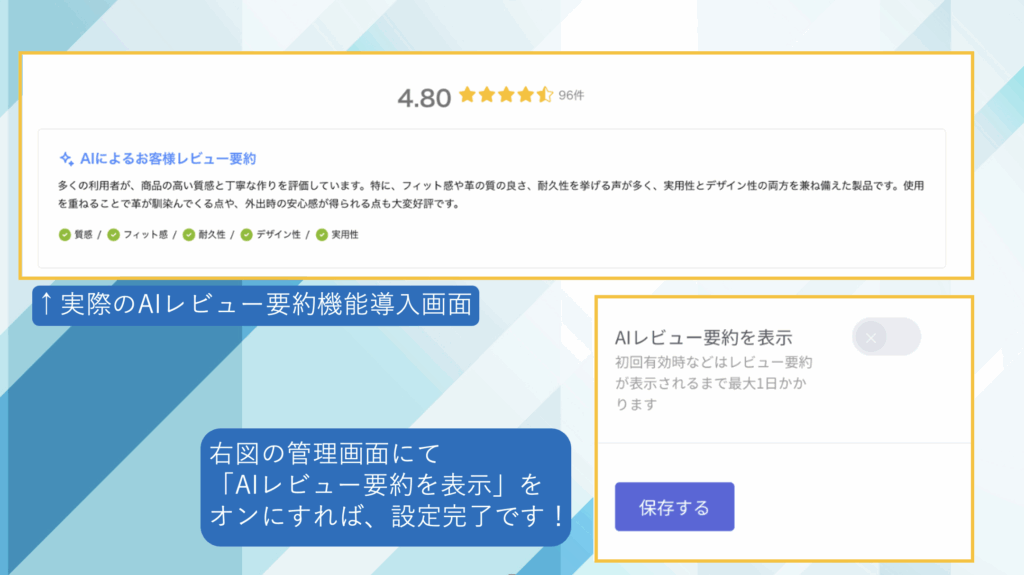
The AI Review Summary feature uses AI to automatically analyze and summarize existing review content, displaying it as a “Review Summary” at the top of the review page.
In addition, it extracts and visualizes up to five keywords (topics). Each keyword is rated on a three-point scale—"Good," "Average," or "Bad"—and presented in a visually intuitive manner.
Keywords judged to be “Good” display a checkmark on the left.
No rating symbol is displayed for “Average.” If a keyword is judged to be “Bad,” a minus sign is displayed.
― About Settings
To use this feature, simply turn on “Display AI Review Summary” in the U-KOMI admin panel.

AI Reduces “Reading Time,” UGC Boosts “Desire to Buy”
― Benefits of Implementation
In today’s purchasing behavior, “researching before buying” is now standard practice.
Many users rely on reviews and personal experiences to determine whether a product is right for them.
The AI Review Summary feature instantly summarizes multiple reviews, allowing users to quickly grasp only the key points.
This not only supports purchases on e-commerce sites but also accommodates hybrid purchasing behaviors such as the following:
・ROPO (Research Online, Purchase Offline): Researching online and then purchasing at a physical store
・Showrooming: Checking a product in a physical store before purchasing it online
— The AI Review Summary feature transforms “reading” into “understanding”
The AI Review Summary feature automatically analyzes review content, providing users with an experience that allows them to “grasp essential information in a short amount of time.”
This feature offers the following benefits:
✔︎ Instantly grasp
the key points without having to read through numerous reviews ✔︎ Immediately address any concerns or anxieties ✔︎ Reduce the stress associated
with making a purchasing decision
In other words, this feature enhances the quality of the user experience not only in online shopping but also in new purchasing behaviors such as ROPO and showrooming.
— The Value of the UGC × AI Review Summary Feature
Reviews are a key factor in building trust in products and services and have a significant influence on purchasing decisions.
However, finding the necessary information among the vast number of reviews that continue to grow daily requires a great deal of time and effort.
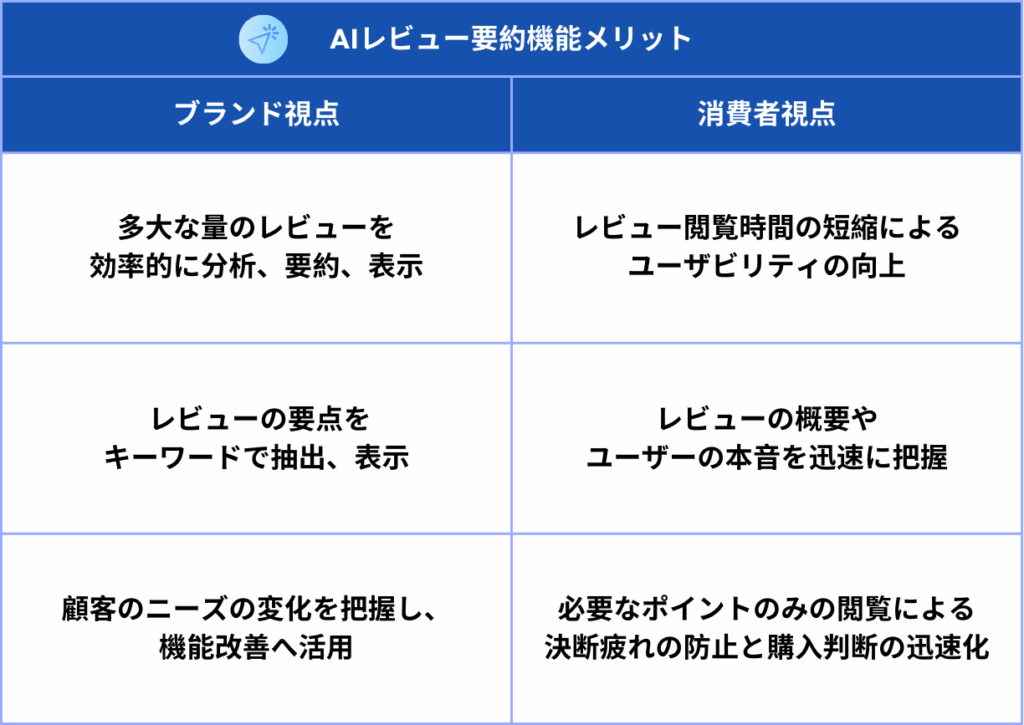
By utilizing the AI review summarization feature, this burden is reduced, allowing users to instantly grasp the essence of reviews.
Displaying the summary at the top of the review section helps users make decisions more smoothly.
The benefits of implementing the AI Review Summary Feature can be summarized from both a brand and a consumer perspective as follows.

Since the AI review summary feature is updated once every 30 days, it improves usability while maintaining the freshness of the content. By checking these AI summary updates, brands can gain new insights into product improvements based on shifts in what consumers are looking for.
2. What Is the AI Review Reply Feature? Streamlining Customer Support with AI
—Overview of the AI Review Reply Feature
AI analyzes reviews posted by users and automatically generates appropriate replies. For reviews written in English, replies are automatically generated in English, making the feature capable of supporting not only Japanese but also multiple languages.
.png)
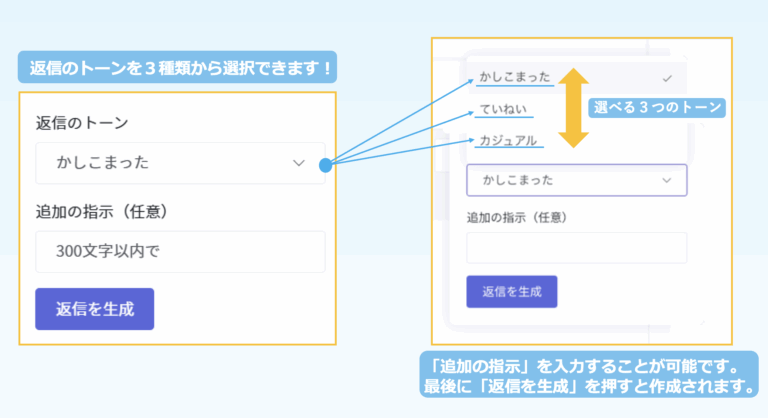
You can choose from three response tones—“formal,” “polite,” or “casual”—and set one of them as the default. If you do not set a default, you can change the response tone for each individual review.
Additionally, if there are specific phrases or items you wish to set as defaults, you can enter additional instructions and configure them (*2).
*2 Additional instructions can be set within a limit of 250 characters.
✔︎ Thank you for your purchase.
✔︎ Thank you very much for taking the time to leave a review.
✔︎ We look forward to your continued patronage.
✔︎ Company names and contact person names, such as “XX Co., Ltd.” or “Contact: XX.”

—About Settings
From the U-KOMI admin panel, when replying to a review, click “Generate Review Reply with AI” to automatically create a reply.
You can also configure default settings under “AI Review Reply Settings” in the “Review Settings” section of the U-KOMI admin panel. By enabling “Automatic Generation,” the reply text will be automatically generated when you send a reply—without needing to click the “Generate Review Reply with AI” button.
—Benefits of Implementation
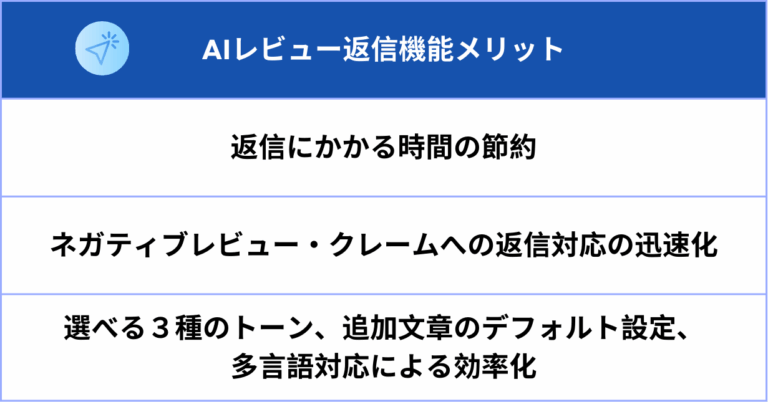
Even if you don’t have time to reply or are struggling to keep up with the workload, implementing the AI review reply feature allows you to draft replies to customer reviews without spending much time or effort on the process.
Since it automatically generates replies to negative reviews and complaints as well, you can save time on drafting responses and create them more efficiently.
You can choose from three different response tones to match your brand or the representative handling the inquiry, and since the system supports multiple languages, you can create responses with greater flexibility.

Furthermore, by responding thoughtfully to customer feedback, you can leverage this tool for one-to-one marketing and loyal customer initiatives—areas where many brands are currently focusing their efforts.
Click here for an article on loyal customers
Click here for an article on one-to-one marketing
3. What Is the AI Score Feature? Improving Review Credibility and Speeding Up Customer Responses
—Overview of the AI Score Feature
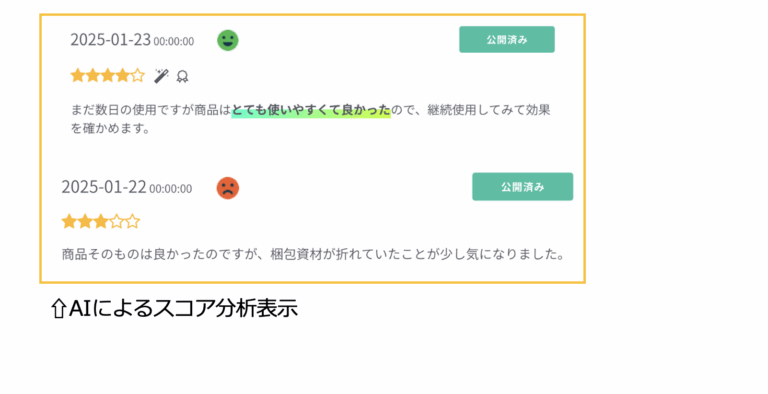
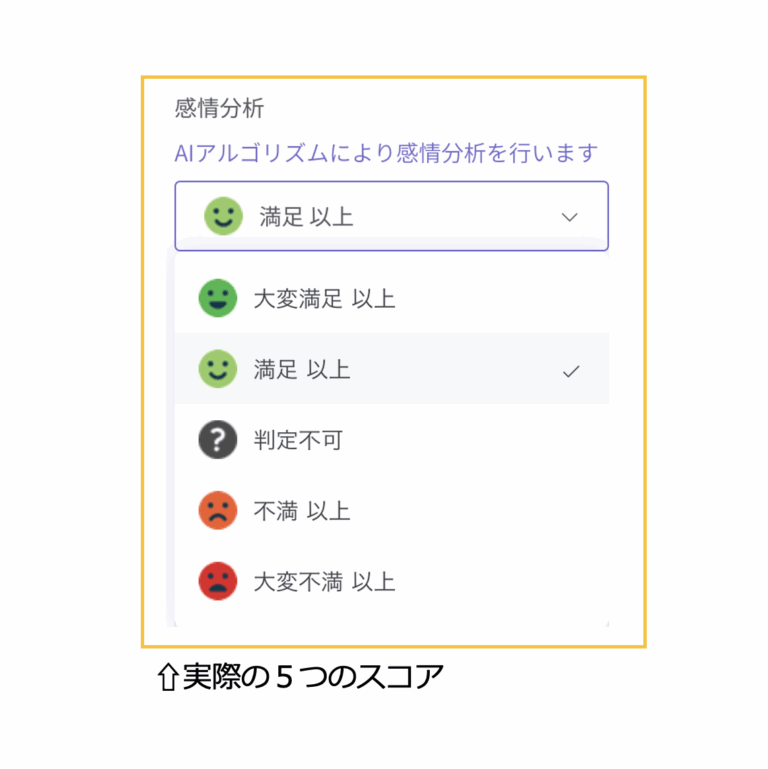
Sentiment analysis is performed using an AI algorithm. After the content is analyzed, the results are displayed on the admin dashboard as one of five scores.

The analysis is categorized into five levels—“Very Satisfied or Higher,” “Satisfied or Higher,” “Unclassifiable,” “Dissatisfied or Higher,” and “Very Dissatisfied or Higher”—and the corresponding scores are displayed on the admin panel.

—About Settings
No special setup is required, but you can use the analysis scores as one of the criteria for automatically publishing reviews analyzed by the AI. Navigate to “Review Settings” → “Automatic Publication” → “Sentiment Analysis” in the admin panel, where you can select your automatic publication criteria from the five sentiment analysis scores.
—Benefits of Implementation
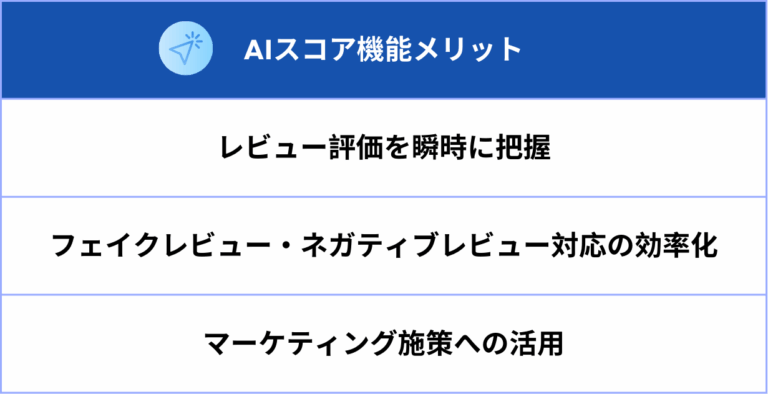
By implementing the AI scoring feature, you’ll be able to instantly grasp the sentiment of reviews posted by customers. Since it becomes easier to distinguish whether a customer has a positive or negative opinion, you can view reviews categorized by positive or negative sentiment and utilize this information for your marketing strategies.
Additionally, by identifying fake or negative reviews and responding appropriately, you can improve the credibility of your reviews.
As a specific countermeasure, set the automatic publication criteria for sentiment analysis to “Satisfied or higher.” This ensures that reviews with positive sentiment analysis results are immediately displayed on the site, allowing customers to view them more quickly.
On the other hand, reviews with negative sentiment analysis results, or those that cannot be classified as positive or negative, can be set to “unpublished.” This allows staff to review these unpublished reviews when they have time and decide whether to publish or keep them unpublished after review.

Among the unpublished reviews, those judged to be fake can be kept on hold while remaining unpublished. While it is possible to keep negative reviews—such as those expressing dissatisfaction with a product—on hold and unpublished, given the current emphasis on review quality, responding thoughtfully to negative reviews can help foster trust.
Furthermore, it is generally believed that consumers tend to trust reviews more on sites that include negative reviews than on those with only positive reviews. This allows you to build a
trustworthy review environment and provide customers with more accurate information.
4. What Is the Automatic Translation Feature? Measures to Improve Usability
—Overview of the Automatic Translation Feature
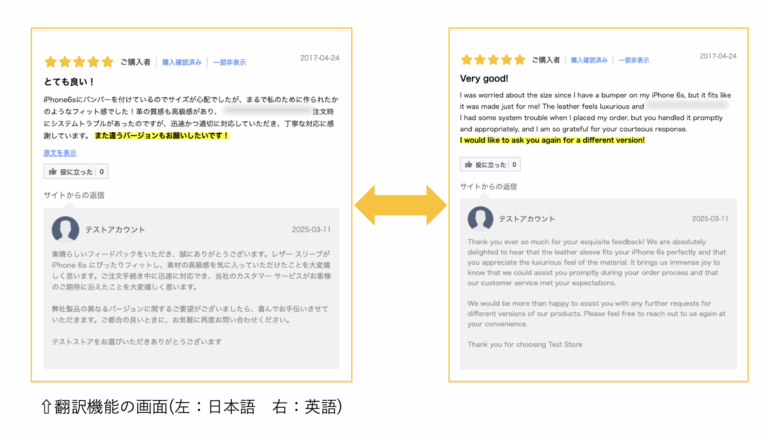
Reviews posted by users are automatically translated into the target language selected by the user. Translation is available into “Japanese,” “English,” “Thai,” “Simplified Chinese,” “Traditional Chinese,” “Korean,” and “French.”
[Currently Supported Languages]
✔︎Japanese
✔︎English ✔︎Simplified Chinese ✔︎Traditional
Chinese
✔︎Thai ✔︎Korean
✔︎French

―About Setup
We handle the setup for this feature; please contact us for details.
―Benefits of Implementation
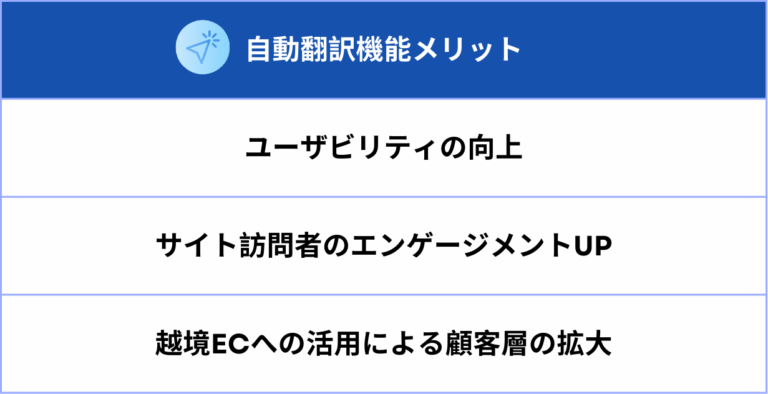
For brands operating cross-border e-commerce, those aiming for global expansion, and those targeting inbound tourists, language barriers pose a significant challenge that greatly impacts usability.By implementing the automatic translation feature, reviews can be translated into the languages specified by users, reducing the burden on users to search for translations. This not only improves site visitor satisfaction and engagement but also helps expand your customer base.

Summary: Boost Review Management Efficiency with U-KOMI AI!
In this article, we’ve explained how to manage reviews using U-KOMI AI. By utilizing U-KOMI AI, you can achieve more efficient and flexible customer support.
U-KOMI is a UGC (User-Generated Content) tool designed to collect and utilize customer feedback. By using this tool, you can not only display reviews attractively on your e-commerce site and improve conversion rates (CVR) by leveraging Instagram content, but also implement features that allow you to utilize reviews—a valuable, dynamic information asset—in real time.We flexibly accommodate a wide range of customer requests!
Why not consider implementing U-KOMI—which features AI capabilities—in alignment with your company’s marketing strategies?
▼Click here for a list of UGC use cases: https://u-komi.com/jirei
▼Download materials here: https://u-komi.com/
▼Contact U-KOMI here: https://u-komi.com/contact/
![[Streamlining Review Management] Accelerate UGC Marketing with U-KOMI AI!](/_next/image?url=https%3A%2F%2Fimages.microcms-assets.io%2Fassets%2F52802991b92c45338b7478be9a902d36%2Fd5ba48638dc44176982526786e3e1862%2Fabout-ai-review-functions.jpg&w=3840&q=75)